

Hey there! As a supplier of Cap Compression Molding Machines, I've got some really cool stuff to share with you about adjusting servo - motor parameters in these machines. It's a topic that might seem a bit technical at first, but trust me, once you get the hang of it, it'll make your machine run like a dream.
Why Adjust Servo - Motor Parameters?
First off, you might be wondering why we even need to adjust these parameters. Well, the servo - motor in a Cap Compression Molding Machine is like the heart of the operation. It controls how the machine moves, compresses, and shapes the caps. If the parameters are off, you could end up with unevenly molded caps, slow production speeds, or even damage to the machine over time.
Let's say you've just installed a new batch of molds in your High Speed Hydraulic Plastic Cap Compression Molding Machine. These molds might have different dimensions and requirements compared to the previous ones. The default servo - motor settings might not be suitable for the new molds, which means you'll need to adjust the parameters to ensure proper molding.
Getting to Know the Basics
Before we dive into the adjustment process, let's quickly go over some basic concepts. The servo - motor in your Cap Compression Molding Machine is controlled by a servo - drive system. This system takes input signals from the machine's controller and translates them into movement for the motor.
The main parameters we'll be looking at are position, speed, and torque. Position refers to where the motor needs to be at a specific time. For example, when the machine is closing the mold to compress the plastic cap, the servo - motor needs to move to the exact position to ensure a proper seal.

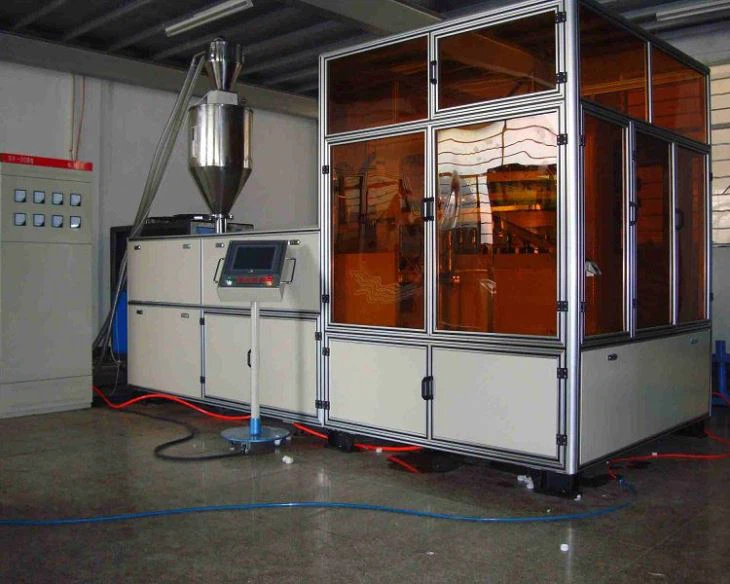
Speed is pretty self - explanatory. It determines how fast the motor moves. In a Cap Compression Molding Machine, you might want different speeds for different stages of the molding process. For instance, you might want a slower speed when inserting the plastic material into the mold and a faster speed during the compression phase.
Torque is the rotational force of the motor. It's crucial for tasks like compressing the plastic to form the cap. If the torque is too low, the cap might not be fully formed, and if it's too high, it could damage the mold or the machine.
Step - by - Step Adjustment Process
1. Initial Setup and Safety Checks
Before you start tweaking any parameters, make sure the machine is turned off and disconnected from the power source. This is for your safety. Also, double - check all the mechanical connections in the machine to ensure they're secure.
Once you've done that, turn the machine on and enter the servo - drive configuration mode. This mode allows you to access and change the motor parameters.
2. Position Parameter Adjustment
The first parameter we'll adjust is the position. In the servo - drive configuration mode, look for the position settings. You can usually find these under a menu like "Position Control" or something similar.
Start by setting the home position for the motor. This is the position where the motor will always return to when the machine is idle. You can set this by manually moving the motor to the desired home position and then saving the setting in the servo - drive.
Next, set the target positions for the different stages of the molding process. For example, you'll need a position for when the mold is open, another for when it's closed, and one for the compression phase. You can use the machine's controller to measure and input these positions accurately.
Let's say you're using a Plastic Cap Compression Molding Machine for Water Lids. The position settings for water lids might be different from those for other types of caps due to their unique shape and size.
3. Speed Parameter Adjustment
After setting the position parameters, it's time to adjust the speed. In the servo - drive configuration mode, look for the speed settings. You'll usually see options for maximum speed, minimum speed, and acceleration/deceleration rates.
Start with the maximum speed. This is the fastest the motor can move during the molding process. You'll need to consider the material you're using, the size of the caps, and the capabilities of the machine when setting this value. For example, if you're using a soft plastic material, you might want to set a lower maximum speed to prevent the material from deforming.
The minimum speed is important for when the motor needs to move slowly, like during the material insertion phase. The acceleration and deceleration rates determine how quickly the motor can speed up and slow down. You'll want to set these values carefully to ensure smooth operation.
4. Torque Parameter Adjustment
Torque adjustment is crucial for getting the right compression force. In the servo - drive configuration mode, find the torque settings. You can usually set a maximum torque value.
The maximum torque value should be set based on the requirements of the mold and the material. If you're using a high - density plastic, you'll need a higher torque value to compress it properly. However, be careful not to set it too high, as this can cause damage to the machine.
You can also set torque limits for different stages of the molding process. For example, you might want to increase the torque during the compression phase and decrease it during the ejection phase.
Testing and Fine - Tuning
Once you've adjusted all the parameters, it's time to test the machine. Start by running a few test cycles with a small batch of caps. Monitor the machine closely during these cycles to see how it performs.
Check the quality of the caps. Are they fully formed? Do they have any defects? If you notice any issues, you'll need to go back and fine - tune the parameters.
For example, if the caps are coming out with uneven compression, you might need to adjust the torque or position settings. If the production speed is too slow, you can try increasing the speed parameters.
Keep in mind that adjusting servo - motor parameters is often a trial - and - error process. You might need to make several adjustments before you get the perfect settings for your specific application.
When to Seek Professional Help
Even though adjusting servo - motor parameters can be done by yourself, there are some situations where you might want to seek professional help. If you're having trouble understanding the servo - drive system or if you've made multiple adjustments and still can't get the machine to work properly, it's a good idea to call in an expert.
We, as a Cap Compression Molding Machine supplier, are always here to assist. If you have any questions or need further guidance on adjusting the servo - motor parameters in your Hydraulic Plastic Sode Cap Compression Molding Machine or any other machine we supply, don't hesitate to reach out. We can provide you with technical support and advice to ensure your machine runs at its best.
Conclusion and Call to Action
Adjusting the servo - motor parameters in a Cap Compression Molding Machine is an important task that can significantly improve the performance and quality of your production. By following the steps we've outlined in this blog post, you'll be well on your way to getting the most out of your machine.
If you're in the market for a new Cap Compression Molding Machine or if you're looking to upgrade your existing one, we're here to help. We offer a wide range of high - quality machines that are designed to meet your specific needs. Don't hesitate to contact us for more information or to start a procurement discussion. We're eager to work with you and help you take your cap production to the next level.
References
- Servo - Motor Basics: A Guide for Beginners
- Cap Compression Molding Machine Operation Manuals